StallFest is a complete Flutter UI kit for multi-vendor marketplace: 3 phone apps (Buyer app, Seller app and Delivery app) and 2 desktop admin panels (Marketplace admin and Super admin). 161 screens in clean Flutter code with no third-party packages, plus the matching Figma design file as a bonus.
Open the live demo and try every screen in your browser.
Demo Instructions
Live demo: https://uikits.appzenic.com/stallfest/
- Choose a role on the start page (for example the customer app or the admin panel) and open any screen from its list.
- Login is open to everyone: no account or sign-up is needed.
- On any sign-in screen you can use Email: demo@example.com and Password: Demo1234, then tap Sign in. Any other email and password also work, and you can leave the fields empty.
- This is a UI kit with sample data and no backend, so nothing you type is sent or saved.
5 apps, 161 screens
- Buyer app (mobile, 48 screens): onboarding, sign in, create account, verify phone, forgot password, home, categories, category page, search results, filters and sort, no results, product detail, choose options, product reviews, seller store, other shops, wishlist, cart, empty cart, coupons, delivery address, add address, delivery options, payment method, review and pay, payment failed, order placed, receipt, orders, order detail, track shipment, delivered, return request, return status, rate items, inbox, chat with seller, notifications, account, personal details, addresses, payment methods, add a card, wallet, invite friends, settings, help, offline.
- Seller app (mobile, 33 screens): sign in, open a shop, verify email, shop setup, verification documents, under review, today, orders, order detail, pack order, ready for pickup, products, product editor, variants and stock, low stock, returns, return detail, payouts, payout detail, bank account, reviews, reply to review, shop insights, promotions, create promotion, inbox, chat with buyer, notifications, store, shipping and handling, settings, seller help, offline.
- Delivery app (mobile, 26 screens): sign in, create account, verify phone, documents, approval, home, online, route offer, route, navigate to pickup, pickup scan, arrived at drop, cannot deliver, proof of delivery, cash collection, return pickup, route complete, earnings, cash to deposit, payouts, payout account, notifications, account, settings, partner help, location off.
- Marketplace admin (desktop, 30 screens): sign in, overview, orders, order, sellers, seller application, seller detail, products, product review, categories, commissions, seller payouts, payout run detail, returns, refund, dispute detail, delivery partners, live deliveries, zones and rates, coupons, new coupon, banners, reviews, buyers, reports, support, roles and access, activity log, settings, plan and billing.
- Super admin (desktop, 24 screens): sign in, overview, marketplaces, approve marketplace, plans and billing, payouts, disputes, support, broadcast, team and roles, activity log, system status, settings, marketplace detail, sellers, buyers, orders, dispute detail, ticket detail, plan editor, payout run detail, category templates, promo codes, suspend marketplace.
Find Things From Many Shops
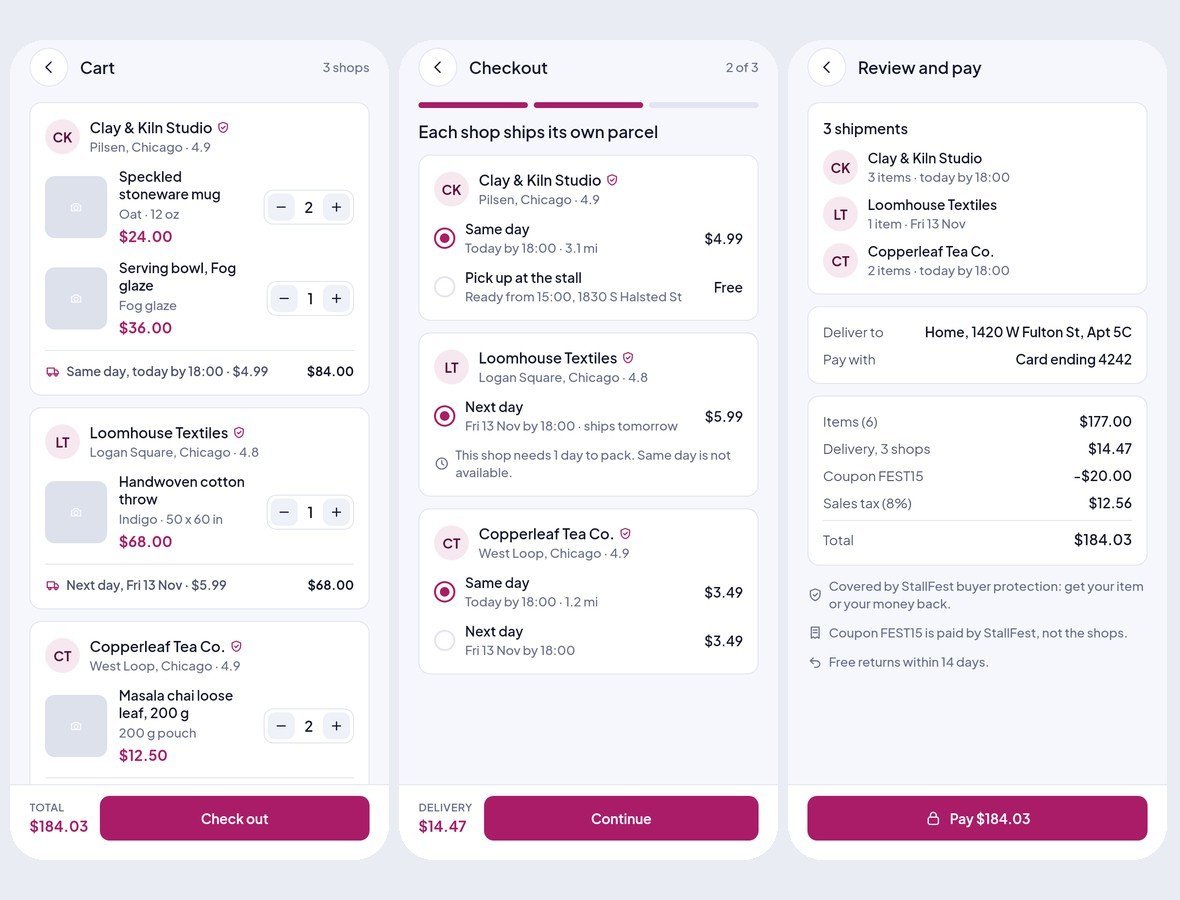
Browse categories, search with filters and sort, open a product with its options, stock and reviews, visit the seller's store or compare other shops that sell something similar.

One Cart, Many Shops
A cart split by seller, a delivery option per shop, coupons, address and payment by card, wallet or cash, with a clear breakdown of every delivery fee. A payment failed screen and an order placed screen are included.
Track Every Parcel, Return With Ease
An order with one shipment per shop, live tracking of the delivery partner, a delivery code, rating, receipt, and a return request with photos and a pickup slot.

Sellers and Delivery Partners Work From a Phone
Sellers accept orders, pack and print labels, manage products with variants and stock, handle returns, run promotions and see payouts. Delivery partners take route offers, scan pickups, deliver with a code, collect cash and see their earnings.

Desktop Consoles With a Sidebar
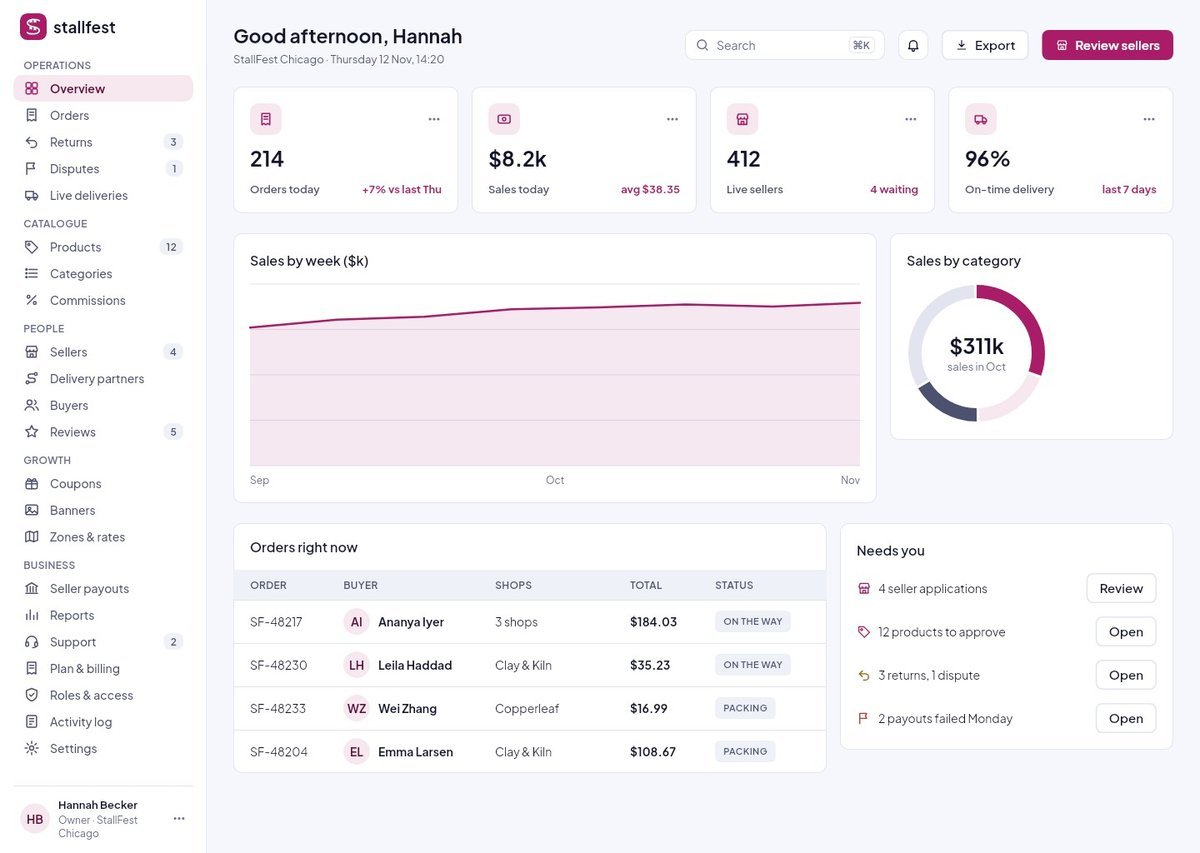
The marketplace team sees every order, approves sellers and products, sets categories and commissions, runs seller payouts, handles returns and disputes, manages delivery partners, zones and rates, coupons, banners, reviews and reports. The platform owner gets a super admin console on top.
Clean Flutter code
- Only the Flutter SDK: no third-party packages, no network calls, no API keys. Run flutter pub get and flutter run.
- One theme: colours, text styles, control heights and radii live in token files. Change the primary colour once and every screen follows.
- A shared component library: buttons, chips, inputs, badges, switches, segmented controls, navigation bars, sidebar, tables, charts, modals and drawers. A Components page shows every variant.
- Every screen is reachable and works like a prototype: tabs, switches, chips and links respond.
- Responsive: phones from 360 pt, tablets, and desktop panels from 1024 pt. Below 900 pt the sidebar becomes a drawer, cards reflow and tables scroll sideways.
- Tested: every screen renders without overflow at phone, tablet and desktop sizes, and a test taps every button and link. flutter analyze reports 0 issues.
- All amounts in US dollars; sample names and cities from around the world.
What you get
- The full Flutter project (Android and iOS).
- Documentation: requirements, installation, folder structure, how to re-theme, how to add a screen, and the screen list per role.
- Bonus: the matching Figma design file.
Requirements
This is a UI kit (front end only) without backend functionality: no server, database, user accounts or payments are included, and every screen shows sample data. To build it you need a current stable Flutter 3 release, plus Android Studio or Xcode for mobile builds. No other packages, accounts or API keys are needed.
Notes
This is a UI kit: there is no backend or payment gateway. Photo slots in the download are neutral placeholders for your own images.